Note: Active beta participants will receive 50% off their first year's commercial license.
Your email is used strictly for license delivery and critical update notifications.
A Note on Security
To ensure your safety, the application is digitally signed by VirtuCath, LLC with a certificate from a trusted authority.
However, because the program is new, Windows Defender SmartScreen may still display a security prompt. This is normal for new software.
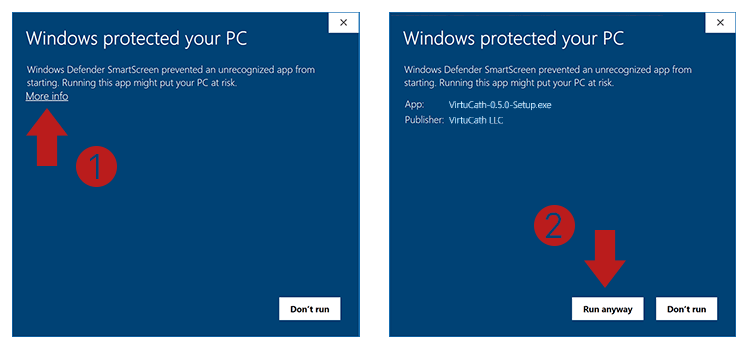
If you see a "Windows protected your PC" screen:
- Click "More info".
- Verify the publisher is "VirtuCath, LLC".
- Click "Run anyway".
The installer has also been scanned by VirusTotal (0/70 detections). You can view the report here.
Release History
Version 0.9.7 March 27, 2026
Release Notes
- Fixed a major bug in the braid calculator
- Improved tuning of catheter calculator
- Program now calculates total length of wire used for braid and coil reinforcements
- Minor UI bug fixes and improvements
Version 0.9.6 March 22, 2026
Release Notes
- Bug Fixes
Version 0.9.5 March 18, 2026
Release Notes
- Minor UI improvements and bug fixes
Version 0.9.4 March 10, 2026
Release Notes
- UI improvements and bug fixes in Flowdown Calculator
Version 0.9.3 March 08, 2026
Release Notes
- Multiple UI Improvements and Bug Fixes
- Added flow down calculator module
- Added the ability to model flat pullwires
Version 0.9.2 February 14,
2026
Release Notes
- UI workflow improvements and bug fixes
- Added manual catheter nudging
- Fixed bug in kink radius calculation
- Fixed bug in braid fill percentage calculation
- Redesign of the simulation control panel
- Improved tuning and simulation accuracy of the MuJoCo model
Version 0.9.1 January 31,
2026
Release Notes
- Improved tuning of dynamic simulation based on user feedback
- Minor UI bug fixes
Version 0.9.0 January 23,
2026
New Features
- Design Optimization Engine (DOE): A powerful new surface exploration module allows users to visualize design spaces.
- Advanced Visualization: Improved braid and coil visualizers with peel-away views.
- Robust Licensing: Secure licensing system with automated updates.
Improvements
- Smart Data Entry: Input fields now support algorithmic math operations.
- Streamlined Setup: Refactored catheter definition workflow.
- Re-Tuned Simulation: The core simulation engine has been re-tuned for accuracy.
Version 0.8.1 Previous
Release
VirtuCath Beta 0.8.1 introduced significant enhancements to the core platform.
Release Notes
- Fixed bugs in coil reinforcement calculation
- Improved braid and catheter visualization widget